How much of your monthly budget is disappearing into SEO subscriptions that you only use for a few minutes a week? For most startups and creators, the real bottleneck is the Content Tax: you pay for expensive data you do not have time to analyze, then spend hours manually writing articles that might never rank. The standard for a free SEO tool in 2026 is no longer just a lack of a price tag; it is whether the software provides actionable data that leads directly to a published, ranking page.
Evaluating free SEO software requires looking past the freemium traps that cap your searches at three per day. A functional stack needs to cover three specific pillars: first-party data for health monitoring, competitive intelligence for keyword gaps, and execution for content production. Most free lists focus entirely on the first two, leaving you with a spreadsheet of keywords but no way to actually turn them into traffic without hiring a dedicated content team.
The tools in this category generally fall into two camps. You have the Data Giants like Google Search Console and Ahrefs Webmaster Tools, which provide the raw numbers you need to understand your current standing. Then you have the Execution Engines like Tydal, which solve the production bottleneck by automating the keyword-to-publication pipeline. Combining these allows a small team to operate with the same output volume as a mid-sized agency without the overhead of manual research and writing.
Use this list to build a workflow rather than a collection of bookmarks. Start with technical health using crawlers, move to intent research with visualization tools, and bridge the execution gap with automation. We have prioritized tools that offer high utility on their free tiers or provide unique data points for AI answer engine optimization (AEO), which is now as important as traditional Google rankings for visibility on platforms like ChatGPT.
The 2026 Free SEO Stack: Moving Beyond Research to Results
Building an SEO strategy with zero budget used to mean spending forty hours a week on spreadsheets. In 2026, the focus has shifted toward high-velocity output. Most free tools provide plenty of data, yet they leave users stranded at the Execution Gap. This gap represents the distance between discovering a high-volume keyword and actually publishing a piece of content that ranks.
Startups and small creators often fall into the trap of collecting freemium tools that offer three searches a day or hide backlink data behind a paywall. These tools help with research, but they do not solve the Content Tax, which is the manual labor required to turn data into traffic. To compete now, your stack must address Answer Engine Optimization (AEO). AI platforms like ChatGPT and Gemini are changing how users find information, meaning your content needs to be structured for both traditional search and AI retrieval.
A modern free stack should prioritize tools that automate the heavy lifting. While Google Search Console and Keyword Planner remain the foundation for data, the bottleneck is almost always production. Using automation tools like Tydal allows you to move from the research phase directly into publication. By automating keyword planning and AI writing, you bypass the need for a dedicated content team while maintaining visibility on both Google and AI-driven answer engines. Success in 2026 is measured by how quickly you can turn a data point into a live, optimized URL.
1. Tydal
Tydal addresses the execution gap where most free SEO tools fall short. While many platforms provide lists of keywords and data points, they leave the actual labor of writing and publishing to the user. Tydal is built for startups and content creators who need to turn search data into organic traffic without the overhead of a dedicated content team.
This tool creates a direct path from discovery to results. By automating the transition from keyword planning to a finished article, it removes the friction of manual drafting and formatting. It allows small businesses to maintain a consistent publishing schedule that can rank on both traditional search engines and modern AI platforms.
Best for automating the end-to-end SEO content lifecycle
Tydal fits businesses that have identified their target audience but lack the time to produce high-quality, search-optimized content at scale. It functions as an execution layer that handles the heavy lifting of production.
What stands out in actual use:
- Workflow Automation: It connects keyword research directly to AI-driven writing and publishing.
- AEO Optimization: Content is structured to be visible on both Google and AI answer engines like ChatGPT.
- Reduced Manual Workload: It automates the formatting and publishing steps that usually consume hours of a creator's week.
- Start-to-Finish Integration: It manages the entire lifecycle of a post within a single interface.
Tydal is focused heavily on content production and publication. It does not provide deep technical auditing features like server log analysis or CSS minification. Users looking for a tool to fix broken code or complex site architecture will need to pair Tydal with a technical crawler. Additionally, the automated publishing feature requires an active website to function as intended.
Tydal is a specialized automation tool that solves the content tax for small teams, moving the needle from research to actual visibility.
Why it solves the Content Tax
For many small businesses, the primary obstacle to growth is the time required to write articles. This is often referred to as a content tax - the high cost of manual labor needed to stay relevant in search results. Tydal helps pay this tax by handling the research and drafting phases automatically. This allows a single founder or creator to manage a content strategy that would typically require multiple hires.
Optimizing for the AI Search Era
SEO in 2026 is no longer just about blue links on a page. Visibility now depends on being cited by AI models and answer engines. Tydal builds content with this shift in mind, ensuring that articles are structured in a way that AI platforms can easily parse and recommend. This dual-focus approach protects your organic traffic as search behavior evolves toward conversational queries.
2. Google Search Console
Google Search Console is the primary diagnostic tool for any website owner looking to understand how Google views their pages. It provides direct data on indexing status, search queries, and crawling errors that no third-party software can replicate with the same level of authority. For a startup trying to gain traction, this tool removes the guesswork by showing exactly which pages Google has successfully crawled and which ones are being ignored.
This tool offers clarity on which pages are actually appearing in search results and which are being held back by technical hurdles. It serves as the bridge between your site backend and the search index, making it the first place to check when traffic fluctuates. While automation tools like Tydal help you produce and publish the content, Search Console tells you if Google is actually reading it.
Best for first-party ranking data and technical health monitoring
For small businesses and content creators, Google Search Console is the starting point for any SEO workflow. It identifies the exact keywords driving clicks and the specific URLs that might be failing Core Web Vitals tests or mobile usability standards.
What stands out in actual use:
- URL Inspection: You can submit new pages for indexing or troubleshoot why a specific post is not appearing in search results.
- Search Performance: View precise click, impression, and average position data for every query your site ranks for.
- Sitemap Submission: Tell Google exactly which pages matter most to ensure your site structure is crawled efficiently.
- Manual Actions: Receive direct notifications if your site is penalized or flagged for security issues like malware.
Google Search Console is strictly limited to your own properties. You cannot use it to spy on competitors or research new keyword niches outside of what you already rank for. The data is also limited to Google search, meaning you will need other tools to track visibility on Bing or AI-driven platforms like ChatGPT. If you want to automate the content production based on the keyword findings you see here, you would look toward a platform like Tydal to bridge the execution gap.
This is the most accurate source of truth for your own site's performance and remains a non-negotiable part of the free SEO stack for monitoring technical health.
3. Ahrefs Webmaster Tools (AWT): Premium Backlink Data for Free
Ahrefs Webmaster Tools (AWT) fills the data gap between basic search metrics and the deep link intelligence typically hidden behind a $100 monthly paywall. It provides a specialized lens for DIY SEOs and small business owners who need to see exactly how the internet perceives their website's authority. By verifying your domain through Google Search Console, you unlock a professional-grade dashboard that monitors your site's health and backlink growth.
The primary workflow benefit is the automated technical oversight. AWT periodically crawls your site to surface broken links, redirect loops, and missing meta tags that might be slowing down your organic growth. This allows you to maintain a clean technical foundation without manually checking every page or paying for a full-scale SEO suite.
Best for monitoring backlinks and identifying technical SEO issues for owned sites
This tool is a perfect fit for website owners who have outgrown the limited link reporting in Google Search Console. While GSC shows you some data, AWT uses its own massive index to provide granular details on referring domains, anchor text, and the strength of individual links.
What stands out in actual use:
- Premium Link Data: View every referring domain and individual backlink pointing to your pages using the same index that powers Ahrefs' paid plans.
- SEO Health Score: Get a clear percentage score that reflects your site's technical integrity, making it easy to prioritize fixes.
- Owned Keyword Rankings: Monitor which search terms are driving traffic to your site and track your position history over time.
The main trade-off is the strict verification requirement. You can only use these features for websites you can prove you own. This means you cannot use AWT to spy on competitor backlinks or research a new market before launching a site. It is a defensive tool designed to help you protect and grow your existing digital property.
AWT serves as a high-fidelity diagnostic tool that brings enterprise-level data to the free SEO stack, focusing entirely on your site's internal health and external authority.
"AWT gives you the link data needed to spot why competitors outrank you without paying for a full subscription."
4. Google Keyword Planner
Google Keyword Planner is the primary tool for advertisers and SEO researchers who need to identify what people are actually typing into the search bar. Built directly into the Google Ads platform, it serves as the foundational source for keyword suggestions and traffic forecasts based on Google's own internal database.
Using this tool provides a direct line to search behavior trends. It allows you to build a list of potential targets with a high degree of confidence because the data comes from the source of the search engine itself. It is a reliable starting point for any campaign that requires hard numbers on search demand.
Best for finding new keywords and analyzing search volume trends
This tool fits small business owners and content creators who need to validate a niche before investing time in writing. It helps you understand if a topic has enough interest to justify the effort or if the competition is too high for a new site to break through.
What stands out in actual use:
- Keyword suggestions: Generate hundreds of related terms based on a single seed phrase or a competitor's URL.
- Historical search volume: View how interest in a specific topic fluctuates over the course of a year to identify seasonal trends.
- Competition levels: See how many advertisers are bidding on specific terms, which often correlates with the commercial intent of the keyword.
The main hurdle is that Google hides precise search volume numbers behind a paywall of sorts. If you are not running an active ad campaign with a minimum spend, you will see broad volume ranges like 100-1k or 10k-100k. This can make it difficult to prioritize between two keywords that fall into the same wide bracket. Additionally, the interface is designed for pay-per-click (PPC) users, so some SEO-specific metrics like keyword difficulty are absent.
Google Keyword Planner remains the industry standard for raw search volume data. While it lacks the automated publishing features found in tools like Tydal, it provides the essential data points needed to inform a manual or automated content strategy.
5. Screaming Frog SEO Spider: The Technical Auditor's Choice
Screaming Frog SEO Spider is the industry standard for technical site audits. It operates as a desktop-based crawler rather than a cloud service, which allows it to mimic how search engine bots navigate your site. It surfaces broken links, redirect loops, and missing meta tags that often drag down search rankings for small business sites.
For startups and content creators, the free version provides a high-resolution snapshot of site health without the overhead of a monthly subscription. This tool is the first choice for identifying why specific pages are not indexing or for auditing a site's architecture before a major content push.
Best for technical SEO audits and site crawling
This software fits site owners who need granular control over their data. While many free tools provide a high-level overview, Screaming Frog allows you to export thousands of data points into a spreadsheet to find patterns in your technical performance. It is particularly useful for those managing their own site maintenance without a dedicated developer.
What stands out in actual use:
- Broken Link Detection: It identifies 404 errors and broken outbound links across your entire site in seconds to prevent link rot.
- Meta Data Analysis: You can view all page titles and meta descriptions in a single list to identify duplicates or snippets that are too long for SERPs.
- Sitemap Generation: It creates XML sitemaps locally, which you can upload to Google Search Console to ensure proper indexing of new pages.
- Audit Redirects: It tracks redirect chains and loops that confuse search engine crawlers and slow down the user experience.
The primary trade-off is the strict 500-URL limit on the free version. For larger websites or content-heavy blogs, this cap means you can only audit specific subfolders or sections of the site at one time. Because it is a desktop application, it relies on your computer's RAM and processing power, which can be a bottleneck on older hardware compared to cloud-based alternatives.
Screaming Frog remains the most thorough technical auditor in the free category. It is a specialized tool for those who want to fix the underlying infrastructure issues that prevent even the best content from ranking.
6. AnswerThePublic: Visualizing Search Intent
AnswerThePublic acts as a search listening tool that scrapes Google's autocomplete data to reveal the specific questions users are asking about any given topic. It is built for content creators and marketers who need to move beyond raw keyword lists and understand the actual language their audience uses when searching for help or information.
By organizing data into visual webs of questions, prepositions, and comparisons, the tool provides immediate clarity on user intent. This allows you to identify the specific long-tail queries that are most likely to trigger "People Also Ask" boxes on Google or be surfaced as answers by AI platforms like ChatGPT.
Best for Content Ideation and Question-Based Keyword Research
This tool is a natural fit for bloggers and small business owners who want to build a content calendar based on real-world curiosity. It helps bridge the gap between having a broad topic and finding the specific angles needed to create an article that provides genuine value to a reader.
What stands out in actual use:
- Visual Mapping: The tool transforms search data into a circular visualization that makes it easy to spot clusters of related questions at a glance.
- Intent Discovery: It highlights comparisons and prepositional phrases, such as "SEO tools for startups," which reveal the specific stage of the buyer's journey.
- Data Exporting: You can download the search webs as images or CSV files to save for future planning or to share with a content team.
The primary drawback is the strict daily limit on the free tier. You only get a few searches per day, which requires you to be very intentional with your queries. If you waste your allowance on a term that is too broad, you will have to wait until the next day to try again. It also lacks the deep search volume and difficulty metrics found in more comprehensive SEO software.
AnswerThePublic is a specialized ideation tool. It does not replace a technical auditor, but it is one of the most effective ways to brainstorm content that answers the exact questions your audience is typing into search engines.
7. Microsoft Clarity
Microsoft Clarity serves webmasters and SEO professionals who need to understand exactly how visitors interact with their content once they land on a page. While traditional SEO tools tell you how people find your site, this platform shows you what they do after they arrive. It captures clicks, scrolls, and movement to help you identify where users get stuck or lose interest.
The primary workflow advantage here is the removal of data caps. Most behavioral tools in the "freemium" category limit you to a small sample of sessions or heatmaps. Clarity provides full access to its entire suite without traffic restrictions, allowing you to collect a comprehensive dataset for every page on your site.
Best for user experience (UX) and engagement tracking
This tool fits any business owner who wants to improve their dwell time and reduce bounce rates by fixing technical friction. By watching how real people navigate your layout, you can make data-driven decisions about button placement, image sizing, and content structure.
What stands out in actual use:
- Unlimited Heatmaps: You can visualize where users click and how far they scroll on any page without worrying about hitting a monthly limit.
- Session Recordings: This feature lets you watch a video-like playback of a user's journey to see exactly where they encountered an error or a confusing UI element.
- Rage Click Insights: The dashboard automatically flags instances where users click rapidly in frustration, highlighting broken links or non-responsive elements that hurt your search rankings.
The main trade-off is the narrow focus on behavioral data. You will not find keyword research, backlink analysis, or competitor tracking features within the dashboard. It is strictly an on-site optimization tool that requires a separate piece of software for your external SEO strategy.
Clarity is a top-tier choice for the UX-focused phase of SEO. It integrates directly with Google Analytics to provide a complete view of the user journey from the first search result to the final conversion.
8. ZestSmartTools: High-Volume AI Search Tracking
ZestSmartTools addresses a growing frustration for SEOs in 2026: the freemium wall. While most free tools limit you to three or five searches a day, this toolkit provides keyword research and visibility data without those traditional daily caps. It is built for users who need to pull larger datasets for research without hitting a paywall every ten minutes.
The workflow focuses on the shift toward AI answer engines. It helps you monitor how your brand appears in generative search results, providing a clear window into your GEO (Generative Engine Optimization) performance. For startups and content creators already using automation to scale their presence, having a reliable way to see where AI tools like ChatGPT or Gemini are sourcing their answers is a necessary part of the modern SEO stack.
Best for tracking visibility in AI search engines (AEO)
This tool fits SEOs and content creators who have moved beyond traditional blue-link rankings and need to understand their footprint in the AI ecosystem. It is particularly useful for startups that want to ensure their technical documentation or blog posts are being cited by large language models.
What stands out in actual use:
- No daily search caps: You can conduct keyword research and visibility checks without worrying about daily usage limits or session timeouts.
- AEO Visibility Tracking: The platform provides specific metrics on how often your content surfaces in AI-generated answers and generative search overviews.
- High-Volume Data Access: It allows for deeper dives into keyword clusters that would usually require a paid subscription in more established suites.
Because ZestSmartTools focuses on high-volume data and AI visibility, it lacks the deep backlink analysis or technical site auditing features found in tools like Ahrefs or Screaming Frog. Users will still need a secondary tool for monitoring link health or fixing crawl errors, as this platform is strictly focused on search visibility and keyword data.
ZestSmartTools is a specialized visibility tracker that solves the search limit pain point for modern SEOs. It bridges the gap between traditional keyword research and the new world of AI answer engines.
9. Ubersuggest: The Beginner-Friendly SEO Dashboard
Ubersuggest serves as a central hub for small business owners and bloggers who need a consolidated view of their search performance without the steep learning curve of enterprise software. It simplifies the research process by pulling keyword suggestions, backlink counts, and site audit results into a single, visual interface.
The tool is built for clarity. For users who find the raw data of Google Search Console difficult to navigate, Ubersuggest provides a digestible summary of where a site stands. It helps bridge the gap between basic data and actionable insights for those who are just starting to build an organic presence and need a quick way to identify low-hanging fruit.
Best for general SEO research for beginners
This tool fits creators who need a quick pulse check on their niche. While it lacks the deep technical crawling of specialized software, it provides enough context to understand why a competitor might be outranking you for a specific term.
What stands out in actual use:
- Simplified Domain Overviews: You can enter a competitor URL to see their estimated traffic and top-performing pages.
- Chrome Extension: This integration allows you to see keyword data directly on the Google results page while you browse.
- Visual Site Audits: The dashboard highlights common errors like missing meta tags or slow load times in plain English.
The free tier is notably restrictive, allowing only three searches per day. This makes it difficult to perform deep, multi-hour research sessions without hitting a paywall. Additionally, the data depth for backlinks and keyword volume is often less comprehensive than what you find in premium, dedicated suites.
Ubersuggest functions as a lightweight dashboard that prioritizes ease of use over massive data volume. It is a solid choice for managing SEO on a part-time basis, though users looking to automate the actual writing and publishing of that research would benefit from pairing it with an execution tool like Tydal.
10. Serpdino: Lightweight Rank Tracking for Small Sites
Serpdino serves niche site creators and small business owners who need a no-frills way to monitor their keyword positions. It removes the complexity of enterprise-level suites by focusing strictly on tracking SERP movements for limited keyword sets, making it a functional addition to a free SEO stack.
The tool provides automated updates, allowing you to see if your optimization efforts are moving the needle without performing manual daily checks. It is a solid choice for those managing a handful of pages who want to keep an eye on rankings without hitting the restrictive daily search limits often found in larger freemium platforms.
Best for tracking keyword positions on small niche websites
This tool fits creators who have moved past the initial content launch phase and now need to monitor their progress on the search results page. It is particularly useful for those who want a dedicated dashboard to visualize ranking trends over time without the data lag sometimes associated with basic reporting tools.
What stands out in actual use:
- Automated Monitoring: The system checks your keyword positions automatically, saving you from manual searches that can skew local results.
- Simplicity: The interface is designed for speed, focusing on the core metric of rank position rather than overwhelming you with technical jargon.
- Truly Free Tier: Serpdino focuses on a functional free tier for small-scale users, which is helpful for those running experimental sites on a zero-dollar budget.
Because it is a lightweight solution, it lacks the depth of a full SEO suite. You will not find backlink analysis, site-wide technical audits, or content optimization suggestions here. It is strictly a rank tracker, meaning you will need to pair it with other tools to handle the actual creation or fixing of your pages.
Serpdino is a specialized utility for the monitoring phase of the SEO lifecycle, providing a clean way to stay informed about your site's visibility.
11. NeuronWriter
NeuronWriter is built for content writers and SEO agencies that need to move beyond basic keyword density and focus on semantic relevance. It analyzes the top-ranking competitors for a specific search term to provide a roadmap of terms and topics that Google expects to see in a high-quality article. This approach ensures your content covers the breadth of a topic rather than just repeating a primary keyword.
The tool simplifies the optimization workflow by providing a real-time content score. This helps you understand exactly how your draft compares to the current SERP leaders before you hit publish. While it is often associated with paid lifetime deals, the limited trial offers a window into how Natural Language Processing (NLP) can refine your writing strategy without the high monthly cost of premium suites.
Best for semantic SEO and NLP-driven content optimization
This tool fits creators who want their articles to satisfy both human readers and search engine algorithms. It uses competitive data to suggest the specific phrases and subheadings that increase your chances of ranking for complex queries.
What stands out in actual use:
- Content Scoring: A dynamic meter that updates as you write, showing your optimization progress against top competitors based on semantic coverage.
- Competitor Structure Analysis: It breaks down the headers and outlines of ranking pages, allowing you to identify content gaps and build a more comprehensive resource.
- AI Writing Assistant: The tool includes features to help generate text or rephrase sections, which can be useful when you hit a creative block during the optimization phase.
- Integrations: You can connect it directly to WordPress for easier publishing or Google Search Console to monitor how your optimized pages are performing.
NeuronWriter is not a forever free tool. Most users will eventually need to transition to a paid plan or find it through a lifetime deal platform. The free trial is strictly limited, making it a better choice for testing a specific high-priority piece of content rather than managing a long-term, high-volume strategy.
It serves as a specialized bridge between raw AI writing and the technical requirements of semantic search for small teams.
12. AIOSEO Analyzer: One-Click On-Page Audits
AIOSEO Analyzer serves WordPress users and beginner SEOs who need an immediate health check on a specific URL. It functions as a web-based diagnostic tool that strips away the complexity of full-site audits to focus on the elements that influence single-page rankings. This makes it a practical choice for small business owners who need to verify their content is technically sound before promotion.
The workflow is built for speed. You paste a link and receive a prioritized list of improvements. It bridges the gap between guessing if a post is optimized and having a concrete checklist to follow before hitting publish or updating old content. By providing a clear roadmap for individual page fixes, it helps users maintain quality without deep technical training.
Best for quick on-page SEO checks and optimization suggestions
This tool fits content creators who manage their own sites and want to verify their on-page efforts without navigating a heavy SEO suite. It is particularly useful for a final check after writing a post or when a specific page starts losing its position in search results.
What stands out in actual use:
- On-page SEO score: You get a numerical value that summarizes the overall health of the page based on standard optimization rules.
- Critical issue alerts: The tool highlights high-priority problems like missing meta descriptions or broken headers that require immediate attention.
- WordPress integration: While it works as a standalone web tool, it connects naturally with the broader WordPress ecosystem for those already using All In One SEO plugins.
A significant limitation is the lack of site-wide crawling. You cannot use this tool to map out the technical health of an entire domain or find sitewide broken links. It is strictly a page-by-page instrument, which means you must manually input every URL you want to analyze. This makes it less efficient for large-scale technical audits compared to desktop crawlers.
AIOSEO Analyzer is a lightweight, specialized utility for the final mile of content optimization. It provides the fast, actionable feedback needed to ensure individual pages meet basic SEO requirements. For startups and content creators who need to move beyond auditing to solve the execution gap of manual writing, pairing these audits with an automation platform like Tydal can further streamline the growth of organic traffic.
Free SEO Workflow Blueprint: From Research to Automation
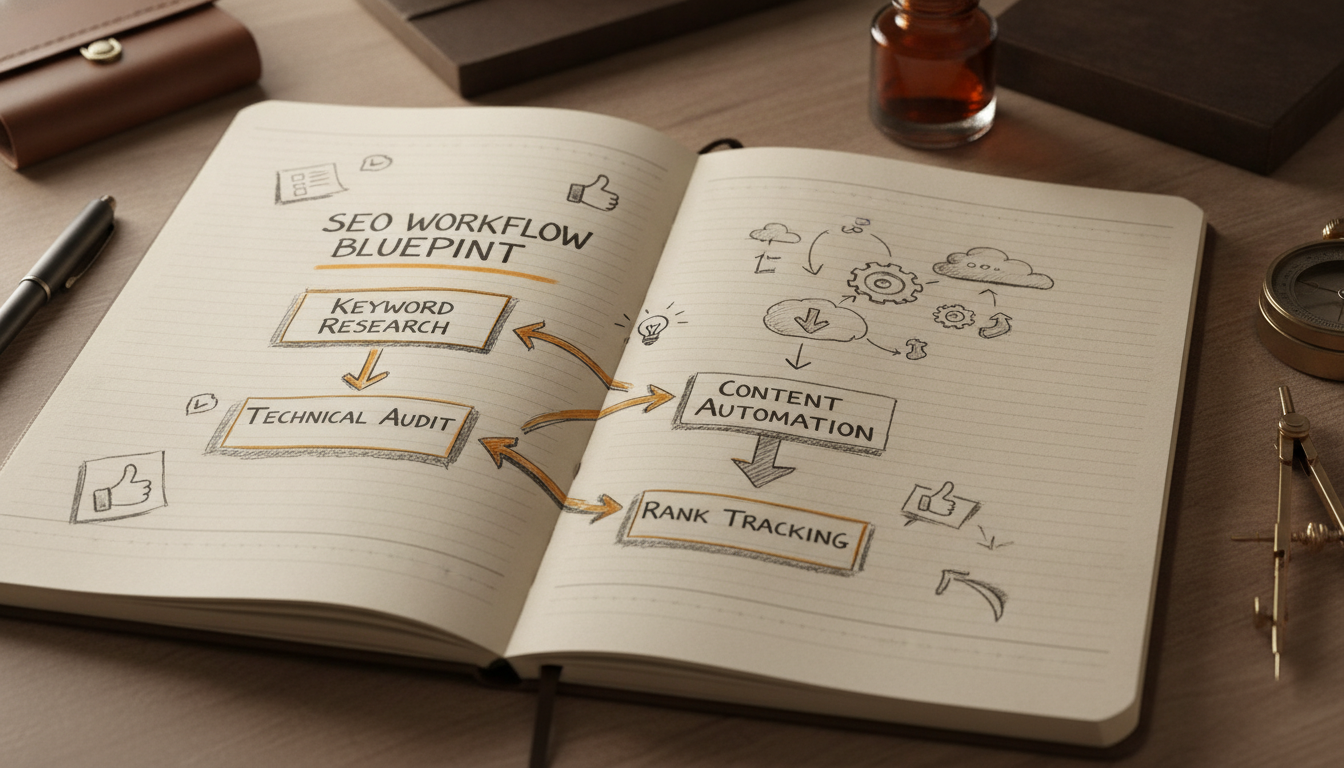
Building a high-traffic site with free tools requires a shift from scattered research to a repeatable pipeline. Most creators fail because they stop after finding keywords, leaving the actual writing to pile up as an insurmountable Content Tax. This blueprint connects the dots between raw data and live pages.
Start by opening Google Search Console to find striking distance keywords. These are terms where your site already ranks in positions 11 through 30. Since Google already views your domain as relevant for these topics, a single targeted article can often push you onto page one.
Next, take those core terms and run them through AnswerThePublic. This reveals the specific questions and long-tail variations searchers use. You now have a list of subheadings that satisfy user intent and improve your chances of appearing in AI-driven answer engines.
The execution gap usually happens at the writing stage. To bridge it, use Tydal to automate the production and publishing process. By connecting Tydal directly to your website, you can transform your research into published SEO content without the manual workload of a full content team. This ensures that your keyword research results in live traffic rather than sitting in a spreadsheet.
Finally, install Microsoft Clarity to monitor how users interact with your new pages. Watch for rage clicks or quick bounces. This data allows you to refine your layout and internal linking, ensuring that the organic traffic you earn actually stays on the site.
Top 12 Free SEO Tools: Features & Pricing Comparison
| Tool Name | Best For | Free Limit | Key Feature | AI/AEO Support |
|---|---|---|---|---|
| Tydal | Automating the end-to-end SEO content lifecycle | Not listed | Automated publishing | Yes |
| Google Search Console | First-party ranking data and technical health monitoring | Entirely free | URL Inspection tool | No |
| Ahrefs Webmaster Tools (AWT) | Premium backlink data for free | Free for verified sites | Backlink monitoring | No |
| Google Keyword Planner | The search volume standard | Free with Ads account | Keyword suggestions | No |
| Screaming Frog SEO Spider | Technical SEO audits and site crawling | 500 URLs per crawl | Broken link detection | No |
| AnswerThePublic | Visualizing search intent | Limited daily searches | Visual search mapping | No |
| Microsoft Clarity | User experience (UX) and engagement tracking | Forever free | Heatmaps and recordings | No |
| ZestSmartTools | Tracking visibility in AI search (AEO) | No daily caps | AEO visibility tracking | Yes |
| Ubersuggest | Beginner-friendly SEO dashboard | 3 searches per day | Domain overview | No |
| Serpdino | Lightweight rank tracking for small sites | Free for small keyword sets | Automated rank tracking | No |
| NeuronWriter | AI-powered semantic optimization | Limited trial | Content scoring | Yes |
| AIOSEO Analyzer | One-click on-page audits | Free web tool | Single-page audit | No |
Choose the Tool That Removes Your Biggest Workflow Bottleneck
Building an organic traffic engine for free requires moving past the data collection phase. Most free SEO software provides an abundance of metrics, but metrics alone do not generate clicks. You should select your tools based on where your process currently stalls. If you are unsure why your pages are not appearing in search results, Google Search Console and Screaming Frog SEO Spider are the logical starting points to diagnose indexing errors and technical site health. These tools provide the raw data needed to ensure search engines can actually read your site.
Content ideation and research often represent the next hurdle. AnswerThePublic and Google Keyword Planner help you understand what your audience is asking, while Microsoft Clarity shows you how they behave once they arrive. These tools are excellent for refining a strategy, but they still leave you with the heavy lifting of production. For many startups and small businesses, the primary bottleneck is not a lack of data, but the time required to turn that data into published articles. This is the execution gap where many SEO strategies fail.
If your main challenge is the sheer volume of manual labor involved in writing and publishing, Tydal offers a different approach. It moves beyond the research phase by automating the keyword planning, AI writing, and publication process. This is particularly useful for creators and B2B startups who need to maintain a consistent content schedule without the overhead of a full content team. It helps bridge the gap between knowing what to rank for and actually having those pages live on your site.
Before committing to a complex stack of tools, test them based on their actual output rather than their feature lists. A tool that provides 500 free keyword suggestions is only valuable if you have the resources to act on them. If you find yourself with a long list of keywords but no time to write, look toward automation. Tydal is a strong option for those who want to focus on growth and visibility on both Google and AI platforms like ChatGPT without getting bogged down in the manual content tax.
Frequently Asked Questions
Can I do SEO for free?
Yes, you can execute a comprehensive SEO strategy using free tools for keyword research, technical audits, and performance tracking. Platforms like Google Search Console and Ahrefs Webmaster Tools provide high quality data without a subscription fee. While free tiers often have usage limits, they are sufficient for most startups and small websites.
What are the best free SEO tools for keyword research?
Google Keyword Planner and AnswerThePublic are among the most effective free options for finding search terms. Keyword Planner provides direct search volume data from Google, while AnswerThePublic visualizes the specific questions users are asking. These tools help you identify high intent topics without an upfront cost.
Is there a free tool for technical SEO audits?
Screaming Frog SEO Spider is the industry standard for free technical audits, allowing you to crawl up to 500 URLs at no cost. It identifies critical issues like broken links, duplicate content, and missing meta tags. For WordPress users, the AIOSEO Analyzer offers a quick web based alternative for individual page checks.
How do I check my website's backlinks for free?
Ahrefs Webmaster Tools (AWT) provides comprehensive backlink data for any website you can verify ownership of. It allows you to monitor your link profile and see which domains are pointing to your site using Ahrefs' premium index. This is a powerful way to track your authority without paying for a full SEO suite.
Are there free tools to help with SEO content creation?
Several tools assist with content, ranging from semantic optimizers like NeuronWriter to automation platforms like Tydal. Tydal specifically helps startups by automating the keyword planning and writing process to reduce the manual workload of content production. These tools ensure your articles are structured to rank on both Google and AI platforms.
Can free SEO tools help me rank on AI search engines like ChatGPT?
Modern tools like ZestSmartTools are designed to track visibility in AI search and Answer Engine Optimization (AEO). These platforms monitor how AI models retrieve and present your information to users. Focusing on structured data and clear answers helps your site become a preferred source for AI generated responses.